ISTE Standards
ISTE Standards for Educators 2: Digital Citizen
2b. Advocate for equitable access to educational technology, digital content and learning opportunities to meet the diverse needs of all students.
ISTE Standards for Educators 5: Designer
5a. Use technology to create, adapt and personalize learning experiences that foster independent learning and accommodate learner differences and needs.
Below is a screencast of me using two different tools: Microsoft Translator and Microsoft subtitles in Powerpoint. I learned that I can download the text file after I am done presenting from Microsoft translator if I need that for any reason. I assume that students can also download a text file in their language if they need that for note-taking purposes. I chose to use both simultaneously to see how they could work together.
I cannot read in Spanish so I do not know how close the translation is but I was very impressed by how quickly the program kept up with my speech.
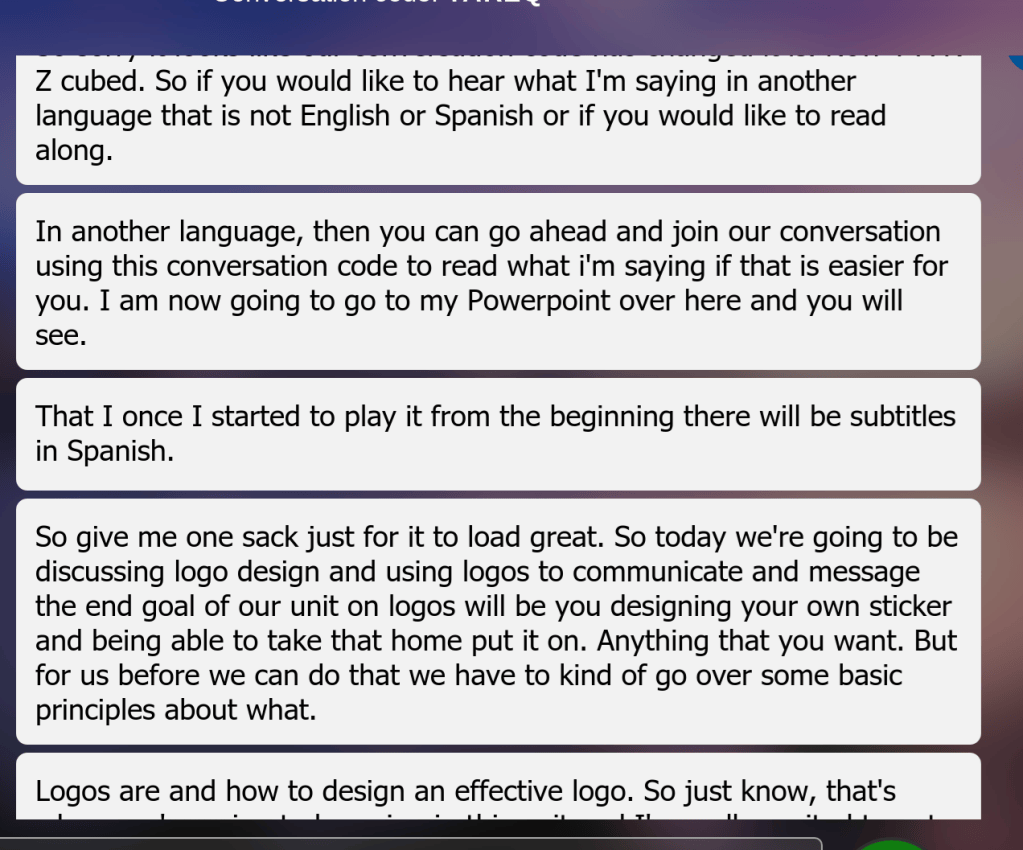
As you can see, there are some typos in my speech with Microsoft translator. It also generally did a good job of keeping up when I was speaking but it seems to be making some mistakes when I pause. When it does this, it then translates the wrong word into whatever language the students may be reading it. While I can figure out that “give me one sack” was me saying “give me one sec” my students might be confused because they would be reading “give me one sack.”
Reflection
I think I will use both of these tools in my future classroom. I am also guessing that the voice recognition software will continually improve over time. I love the idea of being able to deliver content to students in whatever language they are most comfortable with. One question I have is, I ask a lot of questions in my Powerpoint. If students were using Microsoft Translator and they answered back in a language other than English, would I be able to broadcast their response to the whole class using translator? I want to be able to have a dialogue in my class so it is not just me talking at the students but them also being able to engage in the material–even if that means responding in a language that is not English.

